
Masters Pool Spreadsheet & Printable Pick Sheet
Download a free Masters pool workbook for tiered picks, snake drafts, handicapped pools or a random draw, with a sourced historical field and printable forms.
No account needed · .xlsx · Best used on a computer
Tested in LibreOffice Calc. Microsoft Excel verification is pending.
By Clubpicks · Reviewed
Choose how your group will play
New to running a pool? Start with tiered picks: everyone chooses one golfer from each of six tiers, and the best four scores count. Up to 25 entries can share golfers. All four formats use the same free workbook and 120 prepared Field rows.
Download the workbook (.xlsx) or open the blank pick form. The blank form has no field or pool rules. For your group, print the populated form from the workbook after setup.
Prefer a draft, handicapped picks or a random draw?
Choose one format per saved workbook. These are offline formats; the online app has its own roster and scoring rules.
- Snake draft — pick together
- Each entry drafts five different golfers; every golfer belongs to only one entry. Randomly choose draft order, then reverse it each round. Best four adjusted scores count. Up to 24 entries with 120 golfers; the historical 91-player field fits 18 complete teams.
- Handicapped — add a strokes adjustment
- Up to 25 entries choose five different golfers. Golfers can be shared between entries. Enter each golfer’s adjusted score in Field column C and strokes added in column E. Best four count. Zero is valid; a blank handicap blocks ranking.
- Print and collect five-pick entries
- Select Snake draft or Handicapped in Rules B28, then print the one-page Five-pick form and Field list (including strokes added for handicapped play). Record picks and Received on the matching tab. Share its landscape Standings range A35:E65. The optional winning-score prediction is resolved manually using your published tie rule.
- Random draw — assign golfers by chance
- Copy Field B5:B124 as values to Random draw A7:A126. Randomly draw physical slips and record one owner per golfer in column B. Resolve duplicate, missing or unknown assignments. Enter the official champion in Rules B26 to identify the winner. This format does not aggregate scores. Print the Random draw tab for assignments and the result.
Preview how one score update changes the standings
Set up your tiered pool in five steps
- Read Instructions, then complete the editable Rules tab: pool name, deadline, submission destination, cut and withdrawal treatment, tie rule, substitution window and scoring stage.
- Replace the blank names on Field with the confirmed field and assign each prepared row to tier 1 through 6. There are 120 prepared rows in total; tier sizes are your organizer decision. For practice, copy values only from the 2026 field sheet’s A5:B124 into Field A5:B124, then clear Field C5:E124. Its 91 sourced 2026 starters use pre-event OWGR rank and suggested tiers of 10/10/10/10/10/41. This is not a confirmed 2027 field; verify or replace the field and tiers before accepting picks.
- Print and distribute the linked three-page Pick sheet. Record entry names, one golfer per tier, received status and a reference note. Check missing, invalid and duplicate pick flags before the deadline; the workbook does not lock submissions.
- Apply the cut and withdrawal treatment you agreed on, then enter one adjusted score per golfer on Field. Every entry that picked that golfer reads the same score, so you do not re-enter it for each participant. A blank stays missing; zero means even par.
- Share the compact Standings tab once scores are complete and keep the original submissions and reference notes. Resolve tied totals using the rule you published.
This walkthrough uses the six-pick, best-four tiered flow. The format chooser above covers the other three flows. Keep the field, tier assignments and published rules together before collecting entries.
How best-four scoring works
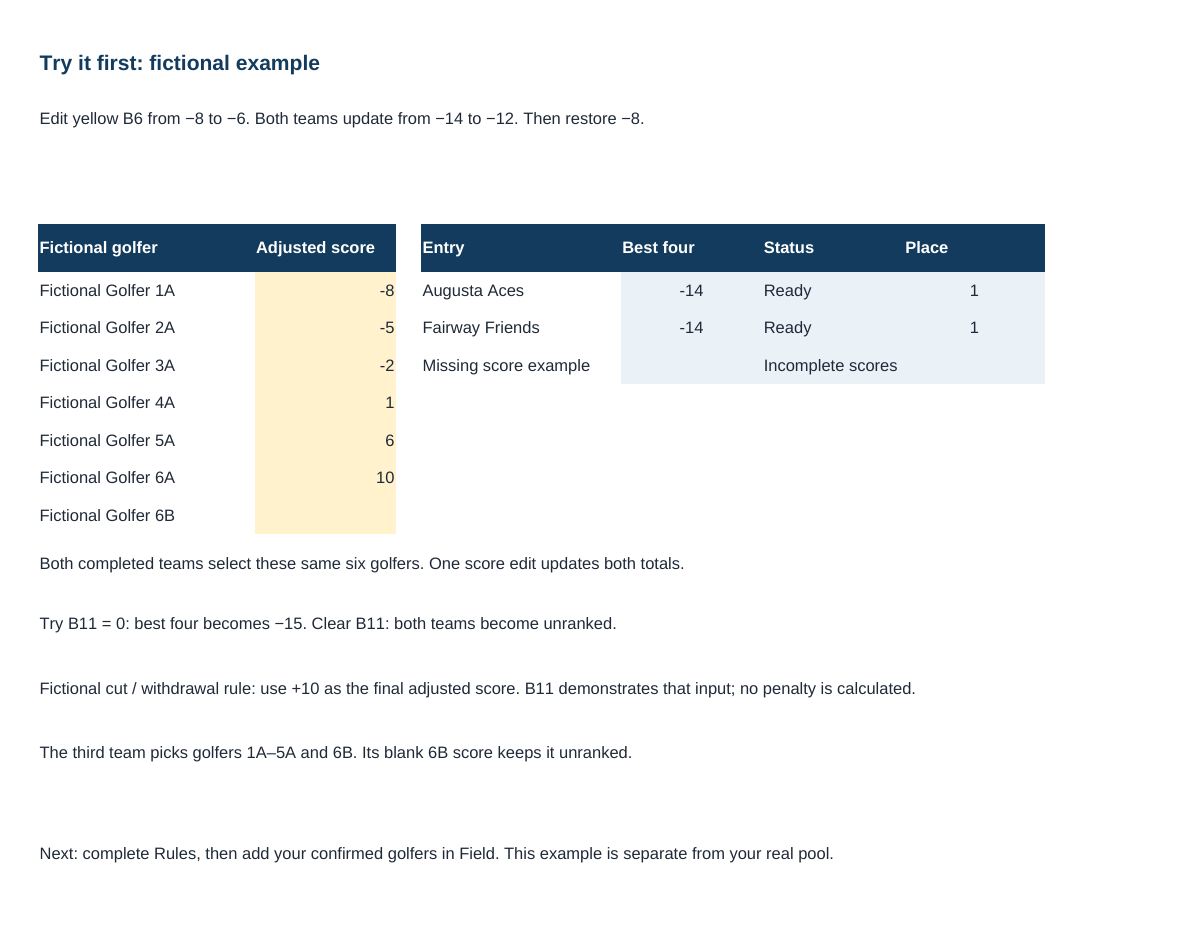
Lower is better in this six-pick, best-four example. If six golfers have adjusted scores of −8, −5, −2, +1, +6 and +10, the best four total −14: −8 − 5 − 2 + 1 = −14. The +6 and +10 do not count. If all six counted, the same team would total +2.
Enter the adjusted score once beside the golfer on Field. A blank score means not entered, while 0 means even par. Do not enter zero as a placeholder for a missing score. The linked Entries and Standings tabs update every entry that selected that golfer, and an entry stays pending until its required scores are complete.
Missed cuts and withdrawals need a rule before play starts. Apply the published treatment to the adjusted score you enter; the workbook does not fetch tournament results, determine a golfer’s status, or calculate a penalty from tournament results. Read the Clubpicks scoring examples if you plan to move your group to the app—its configured rules may differ from your paper pool.
Agree on these rules before sharing the sheet
- Choose your format first: six tiered picks, five draft picks, five handicapped picks or a random draw.
- The three scored formats count the best four adjusted scores. Random draw uses the official champion’s owner. Record when results become final.
- Pick deadline, including the date, time and time zone.
- How missed cuts and withdrawals change a golfer’s score.
- Whether substitutions are allowed, and until when.
- How tied totals are handled and when results become final.
Edit the pool details and treatment choices once on Rules. The linked Pick sheet serves the six-tier format; use the Five-pick form for Snake draft or Handicapped. Review the prefilled house rules and publish any changes before collecting entries. The workbook does not lock entries or import submissions; keep the submitted picks, received status and any later corrections separately. For a group message, you can also use the copyable rules template.
When you want scoring without spreadsheet updates
A spreadsheet suits a group happy to collect picks and enter scores manually. A Clubpicks Masters pool offers online picks and live scoring during tournament play. Confirm the event and field are available before asking your group to enter.
If you move this pool online, invite each participant to join the Clubpicks pool and submit their own roster. Offline workbook entries do not bulk import, and there is no admin quick-entry path for those submissions, so plan that handoff before collecting picks.
The downloads here are free. Clubpicks software has separate pool and Season Pass pricing. Creating a league is free; inviting league members requires a Season Pass. Clubpicks does not collect or distribute pool stakes or prizes.